Configuring a sound system might appear to be a headache when you have a mixing console, microphones, speakers, instruments and so on and all the required cables. However, once you learn about the fundamental signal flow, the process is quite simple.
What is an audio mixer? An audio mixer, also known as a mixing console or sound mixer, takes a variety of different sources of audio and blends them. The sources, which include microphones, keyboards, guitars, computers and music players, are all connected to a computer, which then outputs the mixed audio signal.
No matter if you are in a home studio, live performance, rehearsal room, DJ set, school theatre or PA system, having knowledge of the correct connections allows you to achieve a clear sound and avoid common mistakes. Here we will explain how to connect a mixing console to speakers, and other audio equipments.
What Equipment Do You Need?
Depending on your setup, you may need:
- Mixing console or audio mixer
- Powered or active speakers
- Passive speakers
- Power amplifier for passive speakers
- Microphones
- Keyboard or musical instruments
- Computer, phone or music player
- XLR cables
- TRS or 1/4-inch cables
- RCA cables
- Headphones
- Subwoofer, if required
You do not need all of these for your build. Perhaps a simpler build might be:
Microphone, Mixing Console, Powered Speaker
A larger PA system may use:
Microphones/Instruments, Mixing Console, Amplifier, Passive Speakers
This is the signal flow. To build your audio system, this is the first step.
What Does a Mixing Console Do?
A mixer receives a sound signal from different sources and allows you to control them separately. The live performance could have at least 2 microphones, a keyboard, a guitar and a laptop playing music in the background.
You can equalise or otherwise tweak the volume and tone, etc., of each one before routing the merged signal to the speakers.
Usually, the main output carries the completed mix to the main sound system. Additional outputs, such as AUX outputs or monitor outputs, are often used for stage monitors, headphones or other equipment.
How to Hook a Mixing Console to Speakers
The connection of a mixing console to speakers will depend on whether you are using powered speakers or passive speakers.
1. Connecting a Mixing Console to Powered Speakers
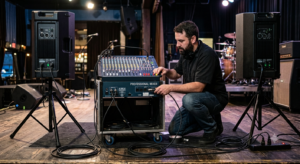
Powered speakers, also known as active speakers, usually have their own power amplifier built in, so they don’t typically need an amplifier between them and the mixer.
The basic connection is:
- Mixing Console MAIN OUT
- Powered Speaker INPUT
For a stereo system:
Connect the main mixer output to the left and right speakers:
- Mixer Left Output: Left Speaker
- Mixer Right Output: Right Speaker
You may be using XLR cables, but check whether your equipment has the inputs and outputs for the appropriate cable.
Setup Step 1 – Turn everything off.
Turn down the mixer and speaker volumes, then switch them off.
Step 2 – Connect the audio sources
Connect your microphone, instrument, keyboard or media player to the appropriate inputs on the mixer.
Step 3 – Connect the mixing console to the speakers
Connect the output from the MAIN OUT, STEREO OUT or MAIN L/R connection on the mixer to the input of the powered speaker.
Step 4 – Now it’s time for the second speaker’s connection
For stereo sound, connect the second main out to the second powered speaker. Some speakers also have a THRU, LINK or OUTPUT connection for linking to the next powered speaker.
Step 5 – Connect the power cable
Step 6 – Finally switch on the system
After ensuring everything is connected correctly, switch on the mixer and then the powered speakers. This way, you reduce the chance of loud thumps or pops that occur during startup.
Step 7 – Set the volume levels
Start with everything turned down and slowly turn the volume up until you find the right levels.
If your powered speaker has a MIC/LINE switch, select the appropriate value when connecting the mixer’s output. Mixer output typically feeds a LINE-level powered speaker.
2. Connecting a Mixing Console to Passive Speakers
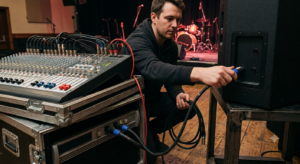
Passive speakers do not have a power amplifier built into them, so they typically require an external power amplifier.
The typical connection flow is:
Mixer → Power Amplifier → Passive Speakers
Do not connect a passive speaker directly to a standard line-level mixer output expecting it to produce sound.
Connecting Passive Speakers
Step 1 – Connect the microphones and instruments to the mixer.
Step 2 – Connect the main output of the mixer to the input of the power amplifier.
Step 3 – Connect the amplifier power output to the passive speakers with appropriate cables.
Step 4 – Check the amplifier requirements and the impedance of the speakers.
Step 5 – Turn on the equipment and slowly turn up the volume.
Why Impedance?
Be sure that the output impedance of the power amplifier matches the impedance of the speakers. If they are mismatched, you can overload your amplifier, which could damage it.
How to Connect a Microphone to a Mixer
Use an XLR microphone cable to connect the microphone to an available XLR input.
The signal flow is:
Microphone → Mixer Channel → Main Output → Speaker
After connecting the microphone, you should:
- Turn the channel down
- Adjust the gain on the channel you are talking into the microphone
- Turn the main volume up until you get the sound you want
- Adjust the channel gain and volume
- Turn up the main volume slowly while you watch for feedback
If your microphone is a condenser, you may need to turn on phantom power, which varies by make and model.
How to Connect a Keyboard or Musical Instrument
Connect your electronic instrument or keyboard to the line input on the mixer using the appropriate type of cable.
(You may need a 1/4-inch cable or a different kind of cable, depending on your equipment.)
When you connect a stereo instrument, connect the left and right outputs, if available, so that the stereo effect is delivered over your speakers.
How to Connect a Computer or Music Player
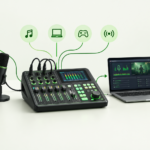
Use your computer, tablet or other music player as a source for playback into the music mixer. You may connect the device to the mixer using a USB port, 3.5 mm jack, RCA, 1/4-inch, XLR connections or an audio interface, depending on the make and model of equipment.
Some digital mixers act as a USB audio interface, so you can connect your computer or tablet to the system.
Again, always check which ports your equipment has before connecting.
How to Connect Speakers to Mixing Consoles
Main speakers deliver the sound to the audience, and monitor speakers let the performers hear each other and themselves. An audio mixer can feed a separate monitor mix through an AUX output:
- Mixer AUX OUT
- Powered Monitor Speaker
You can then change the AUX level on each channel to set the monitor mix. For example: a vocalist might want more vocals, and a drummer might want more keyboards or guitars.
What Cables Do I Need for a Mixing Console?
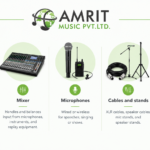
XLR Cable: XLR cables are frequently used for microphones and other balanced audio devices. They work well with the output ports of a mixing console and the input ports of a powered speaker.
TRS Cable: TRS means Tip-Ring-Sleeve, and these kinds of cables are often used for unbalanced line-level connections or some headphone or monitor connections.
TS Cable: TS is Tip-Sleeve, and these cables are common for guitars and other instruments and some unbalanced connections.
RCA Cable: RCA connections are common on consumer audio gear, and occasionally on other kinds of playback devices. The connector does not determine exactly what a device will accept, so always read the manual.
How to Prevent Noise and Distortion
Create a Volume and Gain Strategy:
- Adjust the channel gain to an appropriate volume for that channel.
- Don’t Push a Channel into Clipping
- Keep powered speaker volume low until everyone is ready to turn it on, then turn it up gradually.
- Prevent Electrical Interference
- Keep audio cable length to a minimum and run the cable away from possible interference.
- Make sure powered speakers are set to the correct input.
- Use Balanced Connections
- Always check the equipment before turning it on
- Wrap all of the connections and check connections before powering up.
If you’re getting distortion, lower the volume of the stage or the specific channel rather than turning everything down.
Get Your Audio Gear From Amrit Music
Whether you’re designing a new sound system or upgrading an old one, first check what you will need in terms of size, inputs, speaker types, connectivity, and purpose.
Amrit Music stocks mixing consoles, speakers, monitors, streaming mixers, portable PA systems and amplifiers, plus many other devices and instruments from familiar brands and with many specifications. With 50 years of experience in the music field, Amrit Music can help you to find the best devices for your purposes.
Email us at or call us on 0172-4545490.
Store Location:
Final Thoughts
Connecting a mix mixer to powered or unpowered speakers, monitors, subwoofers or other devices is a process of understanding the sound flow through the system. You can connect powered speakers directly to a mixer, but you’ll need a power amplifier for passive speakers.
Add microphones, instruments, monitors, subwoofers and computers according to your needs.
Always double-check the connection types and read your manufacturer’s manuals to avoid potential damage or unwanted noise. With proper cables and connections, it’s easy to produce a stable sound arrangement. Check out the range of mixers, speakers, monitors and others at Amrit Music.
FAQs
How do I connect a mixing console to speakers?
Connect the main output of the mixer to the input of the speaker. Usually, powered speakers can be connected directly to the mixer, while passive speakers need a power amplifier.
Can I connect the mixer to powered speakers directly?
Yes. Because powered speakers already contain an internal power amplifier, you can generally connect the main output of a mixer directly to the speaker’s input using the appropriate cable.
Do I need an amp for passive speakers?
Yes. Passive speakers generally require an external power amplifier.
What cable do I need to connect the mixing console and the speaker?
This depends on the connectors and the equipment.
How do I connect a microphone to a mix table?
The vast majority of mixing desks take their inputs from a microphone on an XLR cable. Connect your microphone to an empty channel, then turn up the gain and volume controls.
How do I connect a monitor speaker to a mixer?
A powered monitor can often be connected to an auxiliary port of the mixer. This lets you create a dedicated monitor mix for performers.
What is the difference between a powered and a passive speaker?
Powered speakers contain their own internal power amplifier, while passive speakers rely on a separate power amplifier to provide power.